Rock Barometer
Rock Barometer
Track atmospheric pressure on your Wear OS watch, even offline, and view up to seven days of readings.
I made two applications - for smart watches on Wear OS and for a smartphone on Android. Both display atmospheric pressure on a dial and record history for the last seven days. The graph can be viewed directly on the watch.
How it works
Each app takes readings from the device’s built-in pressure sensor. A watch or phone with its own sensor can measure pressure and plot its history independently, even without an internet connection.
A paired watch with a barometer can send its readings and history to your phone, even if the phone has no pressure sensor. If both devices have a sensor, choose Phone or Watch in the phone app. Each source has its own Graph.
When Watch is selected, the phone shows the names of the watch and its pressure sensor. If the connection drops, the needle disappears and dashes replace the current pressure reading. Earlier readings stay on the Graph.
You can download the companion application for Android from Github Releases: https://github.com/RockTroj/rock-barometer/releases/latest
Standalone mode on the watch
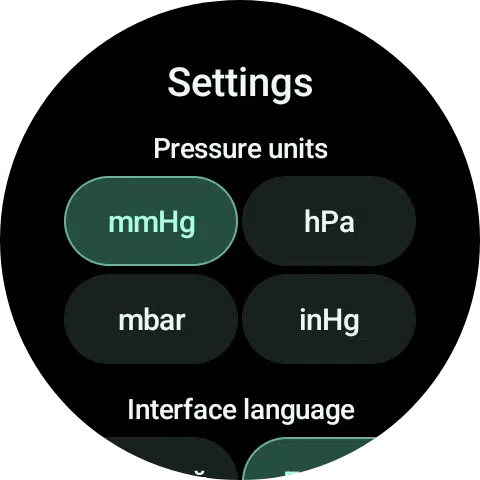
Turn on Standalone mode in the watch app’s settings to save battery. The watch keeps measuring pressure and saves readings locally when history recording is on. Rock Barometer stops syncing readings and history with the companion app on your phone. Your watch stays connected to your phone, so notifications and other connected features continue to work.
Graph and export
On your watch or phone, tap the Graph to see the pressure and exact time of the nearest recorded reading. On your phone, open the Graph full screen in landscape to see individual points more clearly. You can also save the Graph as a PNG image or export the readings as a CSV file.
Watch tile, watch face, and phone widget
Version 2.1.3 added a pressure Graph tile for the watch’s tile carousel. Wear OS limits how often tiles can refresh, so the tile updates less often than the Graph in the app.
On a compatible watch face, add the Rock Barometer complication to see the current pressure at a glance. On Android, add the Rock Barometer widget to your home screen just like any other widget.
Background recording and battery use
For more reliable background recording, turn off battery optimization for Rock Barometer on your watch and phone.
Samsung Galaxy Watch (Wear OS) — Open Settings → Battery → Sleeping apps. If Barometer is listed, remove it from the list.
Android phone — The steps depend on your phone model and Android version.
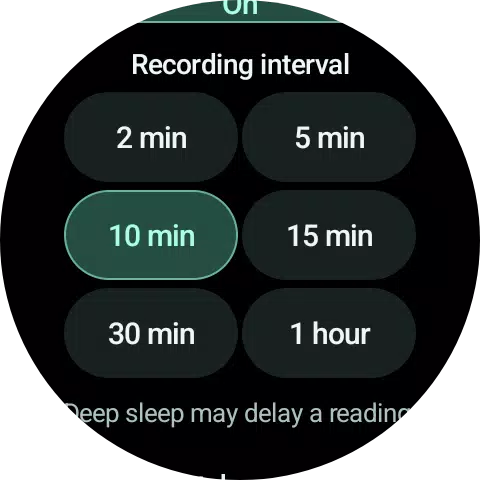
A shorter recording interval uses more battery power but gives you more readings and a more detailed pressure Graph.
Offline pressure readings
Wear OS + Android companion apps
7-day history graph


Key Features of Rock Barometer
Transform your experience with Rock Barometer's main features.
Offline pressure readings
Measures atmospheric pressure without needing the Internet by using the device’s built-in physical barometer sensor.

Explore features and benefits.
Experience innovation at hand.
Download and start using.
Wear OS + Android companion apps
Includes separate apps for Wear OS watches and Android phones, each capable of displaying pressure on a dial and keeping its own data.
Improved performance and stability.
Regular software updates.
Enhanced user experience.
Why choose Rock Barometer
Streamline your life with Rock Barometer today!

7-day history graph
Records and displays a pressure timeline for up to the last seven days, viewable directly on the watch or on the phone.

Works independently on sensor-equipped devices
If your watch or phone has a barometer sensor, it can collect readings and build history on its own, without relying on the other device.

Paired mode: watch can supply phone data
If the phone lacks a barometer, a connected Wear OS watch can transmit its pressure readings and history to the phone. You can download the companion application for Android from Github Releases: https://github.com/RockTroj/rock-barometer/releases/latest
Standalone mode on the watch
Turn on Standalone mode in the watch app’s settings to save battery. The watch keeps measuring pressure and saves readings locally when history recording is on. Rock Barometer stops syncing readings and history with the companion app on your phone. Your watch stays connected to your phone, so notifications and other connected features continue to work.

Reviews about Rock Barometer
Discover our users' feelings and comments.
FAQs about Rock Barometer
Browse the most frequently asked questions that you may interested in.
What is Rock Barometer?
Rock Barometer is an offline barometer app with versions for Wear OS smartwatches and Android phones. It shows atmospheric pressure on a dial and records a history graph for up to seven days, viewable directly on the watch or phone.
Does Rock Barometer require an internet connection?
No. The app can take measurements and plot the graph without the internet because it reads pressure from the physical barometer sensor in the device.
Does my phone/watch need a built-in pressure (barometer) sensor?
To measure independently, yes—the device needs its own pressure sensor. If your phone does not have a barometer, Rock Barometer can still work by pairing with a Wear OS watch that has a barometer and receiving readings from the watch.
Can the watch and phone work together as a pair?
Yes. The apps can work in pairs: for example, a connected Wear OS watch can transmit its pressure readings and history to the phone. If both devices have sensors, you can choose on the phone which source to use, and each source can have its own measurement schedule.
What happens if the phone loses connection to the watch while using the watch as a data source?
If the connection is lost, the phone stops showing the current pressure from the watch (the indicator disappears and dashes appear instead of the current pressure). Previously recorded values remain on the graph.
How long is the pressure history stored and viewable?
Rock Barometer records and displays pressure history for the last seven days.
Can I inspect exact values and times on the chart?
Yes. On both the watch and the phone, you can touch the graph to see the pressure value and the exact time associated with a measurement point.
Can I export or save my pressure data?
Yes. The graph can be saved as a PNG image, and the measurements can be exported to a CSV file.
Are there widgets or watch-face integrations?
Yes. The app supports a Wear OS card (with a lower update rate than the main app due to Wear OS system limits) and can add an icon showing the current pressure value to supported watch faces. Phone widgets are also available and behave like regular widgets.
Where can I download the Android companion app?
According to the official site, the Android companion app can be downloaded from GitHub Releases.
Start your free trial for Rock Barometer today!
Enjoy your everyday with Rock Barometer.
Let's keep in touch!
Subscribe to our newsletter for the latest news and updates.
By subscribing, you agree to Rock Barometer Privacy Policy.